Sustainable procurement inside the systems you already run
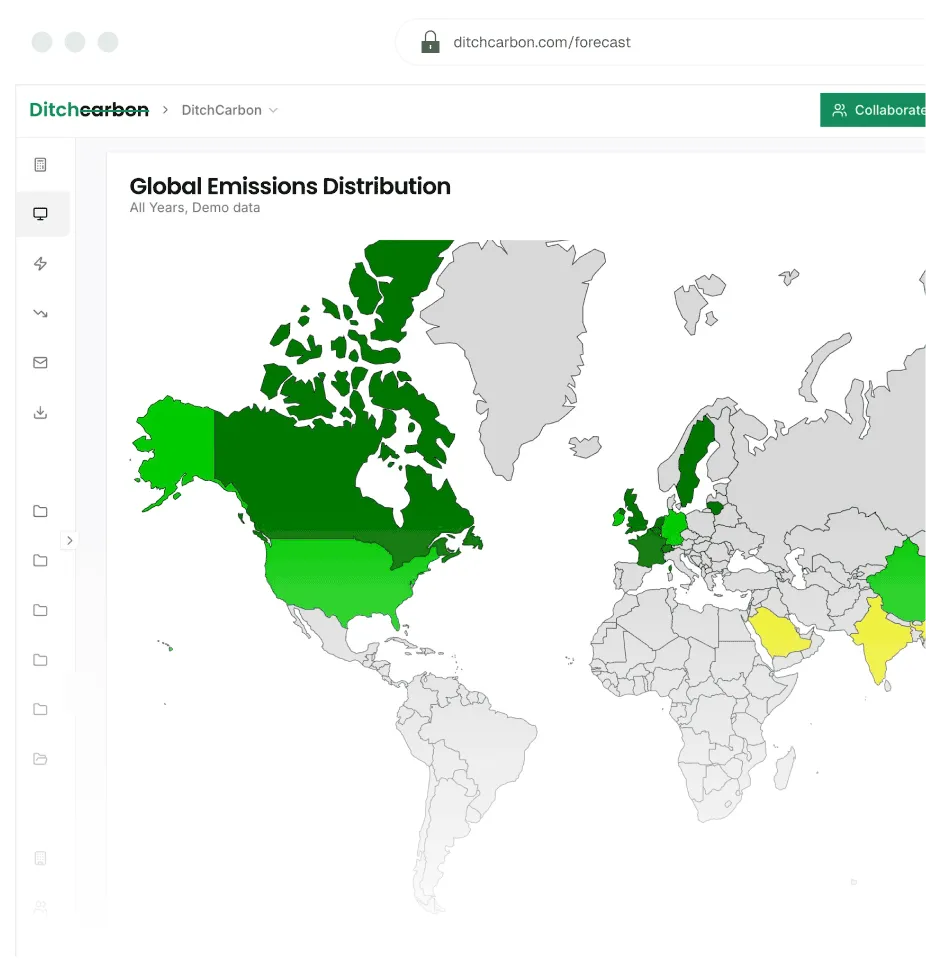
Each supplier's emissions, score and target beside the spend, and the ask written into the RFP and the contract. The sustainability team has a Scope 3 number and a target. Procurement has the suppliers, the categories and the contracts, and a full set of systems already. The gap is that the number lives in one place and the decisions in another. DitchCarbon closes it from the data side: the emissions of the organisations you buy from are already known, from verified emissions data for over 2 million organisations, built on primary emissions data wherever it exists, and they appear wherever your buyers already work, so a category manager weighs carbon in the same screen as price and risk. Ready made connectors exist for the Ariba Risk module, HICX, SpendHQ and others, and the same data goes into any procurement, ERP or sourcing system your team runs. No new tool, no new login, and the data is there on day one because the suppliers who have published are covered before anyone is asked.

Emissions and scores inside any system your buyers already run, Ariba and SAP included
A 0 to 100 score any buyer can act on, with the methodology stated and the source documents behind it
Suppliers compared within a category on carbon as well as price
The ask written into the RFP and the contract
Category targets tracked against what suppliers actually report
Explore this use case
Do we need another tool to bring carbon into procurement?
No. Emissions, carbon risk ratings and supplier scores go into whatever procurement, ERP or sourcing system your buyers already use, so the decision and the data sit in the same screen. The starting point is the system you have, not one we ask you to adopt: the emissions, the score, the target status and the source behind each figure are delivered as data your platform can read, whether that is Ariba, SAP, Coupa, a supplier master, a spend cube or a spreadsheet.
Where a ready made connector exists it is a matter of switching it on. In the SAP Ariba Risk module the ratings sit beside the other risk ratings when a buyer reviews the supply chain, a category or a single supplier. In HICX a new supplier arrives with its DitchCarbon score, so onboarding triages on environmental impact alongside everything else. In SpendHQ the emission factors sit beside the spend analysis category managers already read. SAP 360 carries product carbon footprints for catalogue items, TraceGains puts the data into food and beverage sourcing workflows, and Salesforce Net Zero takes supplier-specific factors in place of industry averages. For anything else, the same data fits the tools you already run, and the integrations page shows what is live.
The data is there when the buyer opens the screen. Suppliers are matched against DUNS, LEI and ISIN identifiers, so the supplier master and the emissions record agree on who is who, and the organisations that have already published are covered before anyone is asked. A category manager is not waiting on a survey to see a number; the survey, where one is needed, is for improving a figure that already exists.
The old way: a carbon dashboard nobody in procurement logs into.
The new way: the supplier's emissions and score in the Ariba screen the buyer was already looking at.

What does a buyer see about a supplier before awarding?
One number they can act on, and everything behind it when they need it. Every supplier carries a DitchCarbon score from 0 to 100, and that score is what a category manager uses in the moment a decision is made: which supplier to shortlist, which to ask a question of, which to leave alone. Nobody has to know what a validated science based target is, or how a product carbon footprint differs from a sector average, to use it.
That is the point of scoring. The alternative is to teach the entire procurement function the ins and outs of the Science Based Targets initiative, the GHG Protocol and product carbon footprints before they can weigh a supplier, and that is not realistic for most sustainability managers, most procurement teams or most suppliers. A score turns the expertise into a figure a buyer can compare with the other figures on the screen, so the sustainability team's knowledge reaches every sourcing decision without the sustainability team being in every meeting.
The score works because it is built in the open. The methodology is stated: the criteria are whether the supplier discloses its emissions, whether it has a target and whether that target is validated, whether its figures are third party verified, and whether it is progressing against what it committed to. Each shows as earned or not, so a buyer can see why a supplier scored 62 rather than 80 and say so in the review, and a supplier can read the same criteria on its own profile and see what would raise it. Filter the list to the unearned criteria and the scorecard becomes the ask.
And when the high level is not enough, the full record is one click away. Under the score sit the supplier's emissions and intensity, where it stands on the maturity ladder, its published targets with an on track, at risk or behind status, and behind every figure the source document it came from, the sentence in that document and the change history since. A supplier challenge, a contested award or an audit gets the full context without a request to the sustainability team, and it is the same evidence the supplier and the auditor see.
The old way: a procurement team that either takes a rating on trust or has to become carbon experts to question it.
The new way: a score anyone can act on, a methodology anyone can read, and the documents behind it when they are needed.
A supplier sustainability score you can open · A figure an auditor can sample


How do I compare suppliers in a category on carbon?
On intensity, not on spend. Suppliers in the same category are ranked by emissions per unit of revenue and by the emissions they carry in your chain, so a small invoice in a carbon intensive sector outranks a large one in a light sector. The top emitters view shows where the category's footprint actually sits. The carbon intensity heatmap adds the second axis: emission factor against DitchCarbon score, coloured by disclosure status and sized by the emissions in your chain, so the high intensity, low maturity suppliers sit in one corner and the ones already doing the work sit in another.
That turns a sourcing decision into one that can be weighed on carbon before it is made. Moving volume from one supplier to another, adding a supplier to a panel, or consolidating a category can each be read off the same view, with the tonnes involved. Where the decision is at item level rather than supplier level, the supplier's product carbon footprints carry the comparison down to the model or material being bought.
The old way: a category reviewed on price, risk and delivery with carbon as a slide at the end.
The new way: carbon on the same screen as the other three, with the suppliers that move the total named.
Category managers drive decarbonisation · Carbon intensity heatmap · Top emitters
How do I put emissions into an RFP and a contract?
Two ways, both from the same record. In the RFP, the emissions criteria arrive with the data already behind them: each bidder's emissions, score and target status are known before the bid comes in, and a DitchSurveys request asks the bidder for what is still missing, prepopulated with what it has published, so the bid carries the data rather than a promise to send it later. The evaluation weights carbon the way it weights price, on figures the buyer can open.
In the contract, each reduction recommendation carries a suggested clause: the commitment, a date, a reporting cadence and a shortfall remedy, with placeholders where the commercial terms belong, so the ask survives the procurement process rather than living in a slide. The clause is a starting point for legal and procurement rather than a finished term, and it copies straight into the sourcing agreement. The plan behind it, built from what a named peer of the supplier has already done, is on the Scope 3 decarbonisation page, and the request the bidder receives is described on the Supplier engagement page.
The old way: a sustainability question in the RFP that every bidder answers yes to, and a decarbonisation expectation in a sourcing policy.
The new way: weighted criteria on known figures and a clause in the contract with a date on it.
Climate criteria in every RFP · Embedding decarbonisation action in every contract · Terms to include in your next procurement deal


How do I track a procurement category against its target?
By the numbers the target is written in. Each category shows its embodied emissions over time, the forecast of where it lands against the trajectory the target requires, and the share of its suppliers with a validated science based target, weighted by count, by spend or by the emissions they carry. Coverage of spend on actual data, the figure a procurement lead is most often asked for, is shown as a proportion of the category, with the method behind every line recorded so the proportion can be checked rather than asserted.
The forecast projects each supplier forward from its reported history and rolls the category up, so a category manager can see how far the reductions suppliers are already making carry the category, and where the gap that needs a sourcing decision sits. It is a projection rather than a measurement, and it carries a reliability notice where a supplier's disclosure is thin. What moves the category is what suppliers actually report, read as they publish it, so the tracking updates without anyone chasing a spreadsheet.
The old way: a category target reported once a year from a survey tracker.
The new way: a category view that shows coverage, forecast and the gap as suppliers publish.
Procurement against the net zero target · The people who spend the money · Emissions forecast
If you are the supplier being scored
Your customers' buyers see the same score and the same record. Claim your profile to check the criteria, add what you have already published, and answer once for every buyer who asks.
Related articles
Frequently asked questions
Get answers to the questions climate-risk and sustainable-finance teams ask most often.
Software that puts environmental data, above all supplier emissions, into the decisions procurement already makes: supplier selection, category reviews, RFPs and contracts. The useful version does not ask buyers to work in a new tool. It brings the figure, the score and the source document into the sourcing systems they already use, beside price and risk.
Any of them. The emissions, score, target status and source behind each figure are delivered as data your procurement, ERP or sourcing platform can read, whatever it is. Ready made connectors exist for the SAP Ariba Risk module, SAP 360, HICX, SpendHQ, TraceGains and Salesforce Net Zero, and the integrations page shows what is live.
Yes. DitchCarbon emissions and carbon risk ratings appear inside the SAP Ariba Risk module, so buyers weigh climate impact when they review the supply chain, a category or a single supplier. It is activated through the SAP marketplace or your SAP account manager, with no separate login for the buyer.
No. The data appears inside the system they already use, through a ready made connector where one exists and as an integration into your own platform where one does not. The DitchCarbon platform itself is there for the sustainability team and for anyone who wants the full record, the documents and the change history.
On a 0 to 100 scale a buyer can use without being a carbon specialist. The methodology is stated: whether the supplier discloses its emissions, has a target and whether it is validated, has third party verified figures, and is progressing against its commitments. Each shows as earned or not, so buyer and supplier both see what would raise it.
Because teaching a whole procurement function the Science Based Targets initiative, the GHG Protocol and product carbon footprints before it can weigh a supplier is not realistic. A score carries that expertise into the decision as one comparable figure, with the methodology and the source documents there for anyone who needs to go deeper.
Yes. Every figure that feeds the score carries the source document it came from, the sentence in that document and its change history, so the full context is one click away when a supplier challenges a rating or an auditor samples a line. The supplier sees the same record on its own profile.
Yes, on intensity and on the emissions each carries in your chain rather than on spend. The top emitters view ranks the category, and the carbon intensity heatmap plots emission factor against score, coloured by disclosure status, so the suppliers that need attention and the ones already reducing sit in different corners.
Start from known figures. Each bidder's emissions, score and target status are already on its record, so the criteria can be weighted on data rather than on a yes or no question. A prepopulated data request asks bidders for what is missing, so the bid carries the data. See climate criteria in every RFP.
Yes. Each reduction recommendation carries a suggested contract clause with the commitment, a date, a reporting cadence and a shortfall remedy, with placeholders for the commercial terms. It is a starting point for your legal and procurement teams rather than a finished term, and it copies straight into a sourcing agreement.
Each category shows its embodied emissions over time, a forecast against the trajectory the target requires, the share of suppliers with a validated target, and coverage of spend on actual data as a proportion. The forecast is a projection with a reliability notice, and it updates as suppliers publish.
Yes. Every figure carries its source document and change history, and the method that produced it is recorded on the line, so an auditor can sample any supplier or category. The calculator the figures run through is verified to ISO 14064-3, limited assurance, by UL Solutions. Documents are in the trust centre.
See what your category managers would see
Send a sample of your supplier list. We show the score, emissions and target status your buyers would see beside each supplier, and which categories carry the emissions.