.svg)
Thirteen export datasets
DitchCarbon exports thirteen separate datasets as CSV or Excel, covering emissions, disclosures, scores, targets, actions, recommendations, case studies and EcoVadis performance.
Thirteen datasets, as CSV or Excel, chosen individually or bundled into one download. They cover emissions calculations, dashboard and organisation data, supplier Q&A context, Scope 3 disclosures, maturity criteria, reduction actions and targets, recommendations, case studies, EcoVadis performance, embodied emissions by scope, and SBTi progress.
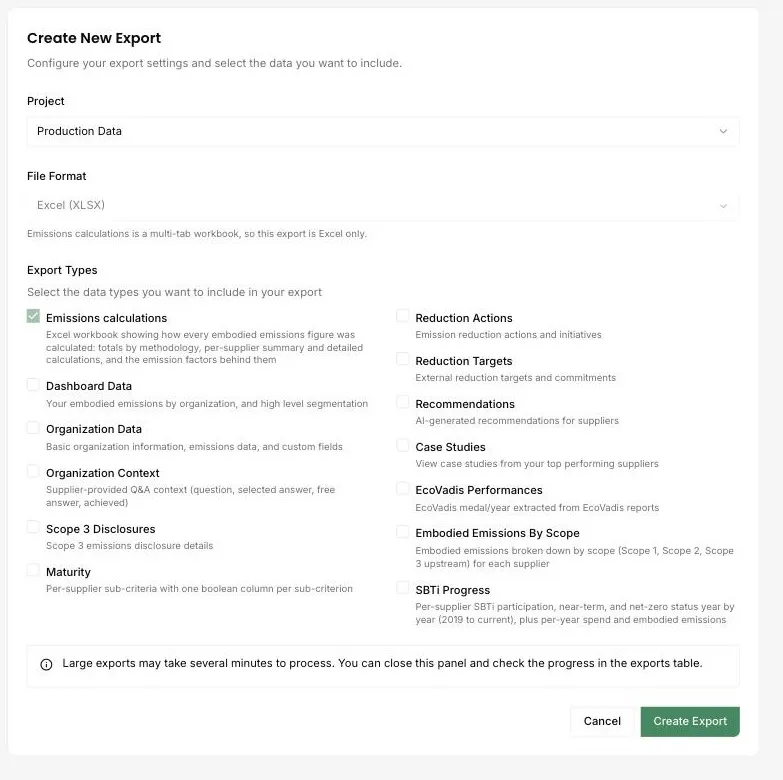
An export is only useful if it matches the shape of the question. One wide file covering everything means whoever receives it starts by deleting columns, so the datasets are separate and selected per export.
Several are built for a specific downstream job. SBTi progress arrives as per-organisation status year by year with spend and emissions attached, which is the shape a supplier engagement report needs. Embodied emissions by scope splits Scope 1, Scope 2 and Scope 3 upstream per organisation, which is the shape an inventory system wants.
Exports are scoped to a project, so a division or a client engagement can be sent on without the rest of the account travelling with it.
Larger exports run in the background and appear in the history when ready, rather than holding a browser tab open.
Common questions

See it on your own suppliers, portfolio or profile
Numbers you can defend within 2 weeks, or one profile that answers every buyer asking.